
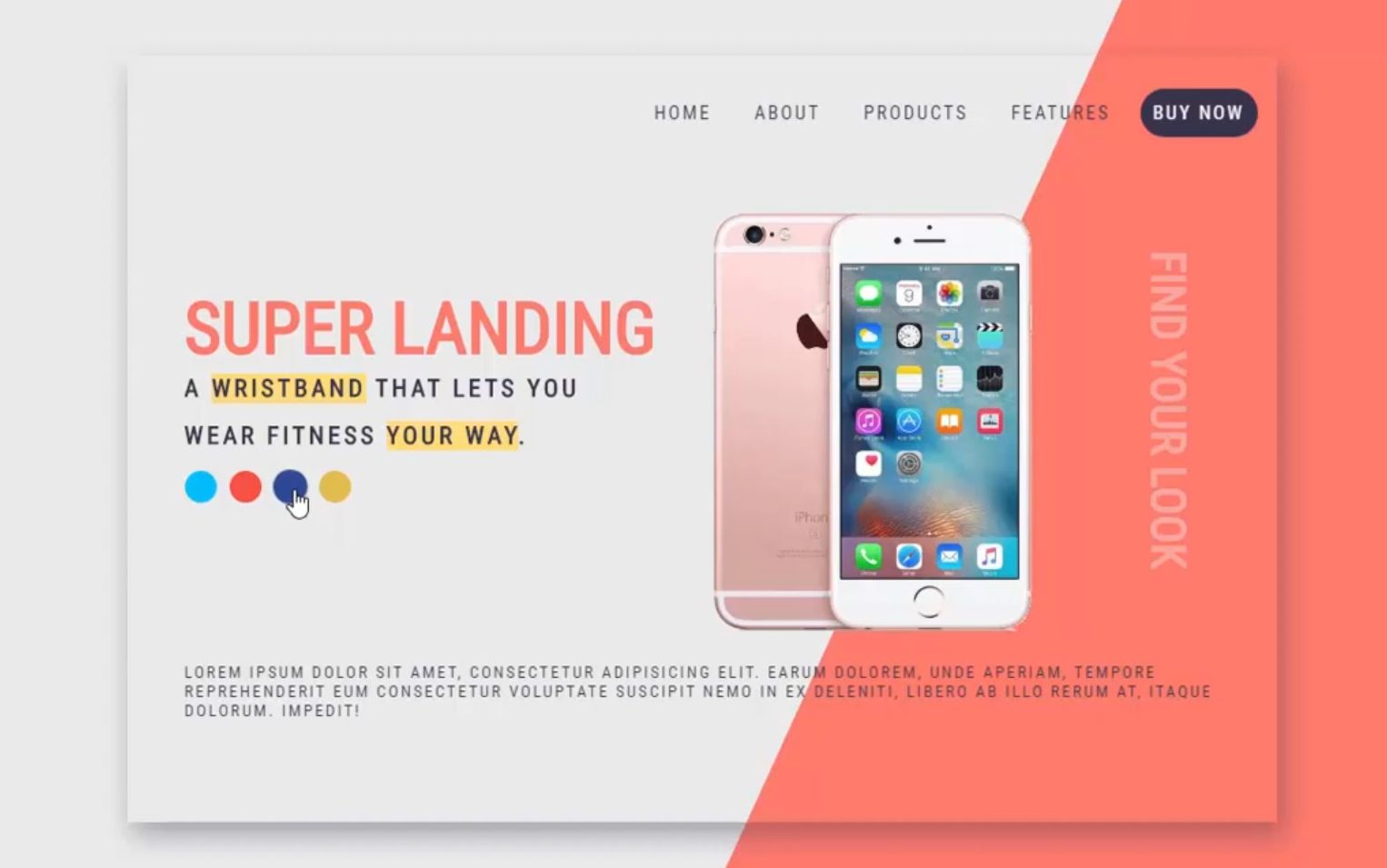
js控制布局css样式改变,不刷新切换产品和布局背景cid1162
html and css
<!DOCTYPE html>
<html lang="en">
<head>
    <meta charset="UTF-8">
    <title>landing page design</title>
    <link href="https://fonts.googleapis.com/css?family=Roboto+Condensed&display=swap" rel="stylesheet">
    <style>

 body {
 background: #ebebeb;
}
 a {
   cursor: pointer;
}
 #container {
   height: 600px;
   width: 900px;
   margin: 15% auto;
   position: relative;
   box-shadow: 4px 10px 20px rgba(55, 52, 73, .4);
}
 #background {
   position: fixed;
   bottom: 0px;
   right: 0px;
   width: 50%;
   height: 100%;
   background: #ff7a6c;
   -webkit-clip-path: polygon(52% 0, 100% 0, 100% 100%, 0% 100%);
   clip-path: polygon(52% 0, 100% 0, 100% 100%, 0% 100%);
   z-index: -1;
   transition: all 0.8s ease;
}
/* navigation */
 nav {
   display: block;
   float: right;
   margin: 1em;
   margin-top: 2.4em;
   font-family: 'Roboto Condensed', sans-serif;
   font-size: 15px;
}
 .navbar a {
   padding: 10px;
   margin-left: 10px;
   border-radius: 25px;
   text-decoration: none;
   text-transform: uppercase;
   letter-spacing: 2px;
   color: #373449;
     padding: 10px 10px;
}
 .navbar a:hover {
   background: #34495e;
   padding: 10px;
   border-radius: 25px;
   transition: all 0.5s ease;
     color: white;
}
 .navbar a:last-child {
   background: #373449;
   color: #fff;
   padding: 10px;
   border-radius: 25px;
}
 .navbar a:last-child:hover {
   color: #fff;
   background: #ffdc7b;
   transition: all 0.5s ease;
}
/* sections */
 .section {
   position: absolute;
   margin-top: 5%;
   margin-left: 5%;
   width: 100%;
   height: 80%;
}
 .button {
   position: absolute;
   width: 25px;
   height: 25px;
   border-radius: 50%;
     cursor: pointer;
}
 .button:hover {
   transform: scale(1.1);
   transition: all 1s ease;
}
 .rosegold {
   background: deepskyblue;
}
 .coral {
   background: #f85241;
   left: 35px;
}
 .fuschia {
   background: #2c4895;
   left: 70px;
}
 .black {
   background: #e0bc4d;
   left: 105px;
}
/* text-styling */
 h1 {
   font-family: 'Roboto Condensed', sans-serif;
   color: #ff7a6c;
   text-transform: uppercase;
   font-size: 3.5em;

}
 #title {
   transition: all 1s ease;
}
 h2 {
   font-size: 1.2em;
   text-transform: uppercase;
   margin-top: -20px;
   letter-spacing: 3px;
   font-family: 'Roboto Condensed', sans-serif;
   color: #373449;
}
 p {
   font-family: 'Roboto Condensed', sans-serif;
   font-size: 0.8em;
   letter-spacing: 2px;
   display: inline-block;
   padding: 0 45px;
   text-transform: uppercase;
   color: #373449;
}
 #desc {
   position: absolute;
   top: 77%;
}
 .look {
   position: absolute;
   color: #ededed;
   opacity: 0.4;
   right: 5px;
   top: 185px;
   font-size: 2.3em;
   white-space: nowrap;
   transform: rotate(90deg);
}
 .highlight {
   background-color: #ffdc7b;
}
 .margin-top {
   margin-top: 135px;
}
 .less-margin {
   margin-top: -35px;
}
/* image */
 .alta img {
   height: 370px;
   position: absolute;
   top: 50px;
   right: 140px;
   z-index: -1;
}
 #alta img {
   transition: all 1s ease;
}


    </style>
</head>
<body>

    <div id="container">
  <nav class="navbar">
    <a>Home</a>
    <a>About</a>
    <a>Products</a>
    <a>Features</a>
    <a>Buy Now</a>
  </nav>
  <div id="background"></div>

  <div class="section">
   <h1 id="title" class="margin-top">SUPER LANDING</h1>
   <h2 class="less-margin">a <span class="highlight">wristband</span> that lets you </h2>
   <br><h2>wear fitness <span class="highlight">your way</span>.</h2>

  <h1 class="look">Find your look</h1>
  <div class="alta">
    <img id="alta" src="im.png">
    <div class="button rosegold" id="rosegold" onclick="rosegoldColor()"></div>
    <div class="button coral" id="coral" onclick="coralColor()"></div>
    <div class="button fuschia" id="fuschia" onclick="fuschiaColor()"></div>
    <div class="button black" id="black" onclick="goldColor()"></div>
   </div>
 </div>
  <p id="desc">Lorem ipsum dolor sit amet, consectetur adipisicing elit. Earum dolorem, unde aperiam, tempore reprehenderit eum consectetur voluptate suscipit nemo in ex deleniti, libero ab illo rerum at, itaque dolorum. Impedit!</p>
</div>

<script>
    let alta = document.getElementById('alta');
let background = document.getElementById('background');
let title = document.getElementById('title');

function rosegoldColor() {
  alta.src='non.png';
  background.style.backgroundColor = 'deepskyblue';
  title.style.color= 'deepskyblue';
}

function coralColor() {
  alta.src='im.png';
  background.style.backgroundColor = '#FF7A6C';
  title.style.color= '#FF7A6C';
}

function fuschiaColor() {
  alta.src='ima.png';
  background.style.backgroundColor = '#5b2e9a';
  title.style.color= '#5b2e9a';
}

function goldColor() {
  alta.src= 'non.png';
  background.style.backgroundColor= '#e0bc4d';
  title.style.color= '#e0bc4d';
}


</script>

</body>
</html>

获取源码: landing
下载数:136人次, 文件大小: 1.9 KB, 上传日期: 2021年-6月-23日
公众号回复:gcode 获取解压密码

2,478 人查阅
一键获取本网站前端代码设计的所有源码
获取资源构建和完善自己的源码库
源码可以在本地直接演示
同时研究和体验 如何将一些具体的想法的实现过程
源码可以直接嫁接到自己的网站里复用
稍作修改成为自己的作品
您需要先支付 8元 才能查看此处内容!立即支付